Chapter 3: Software Requirements Specification
Introduction
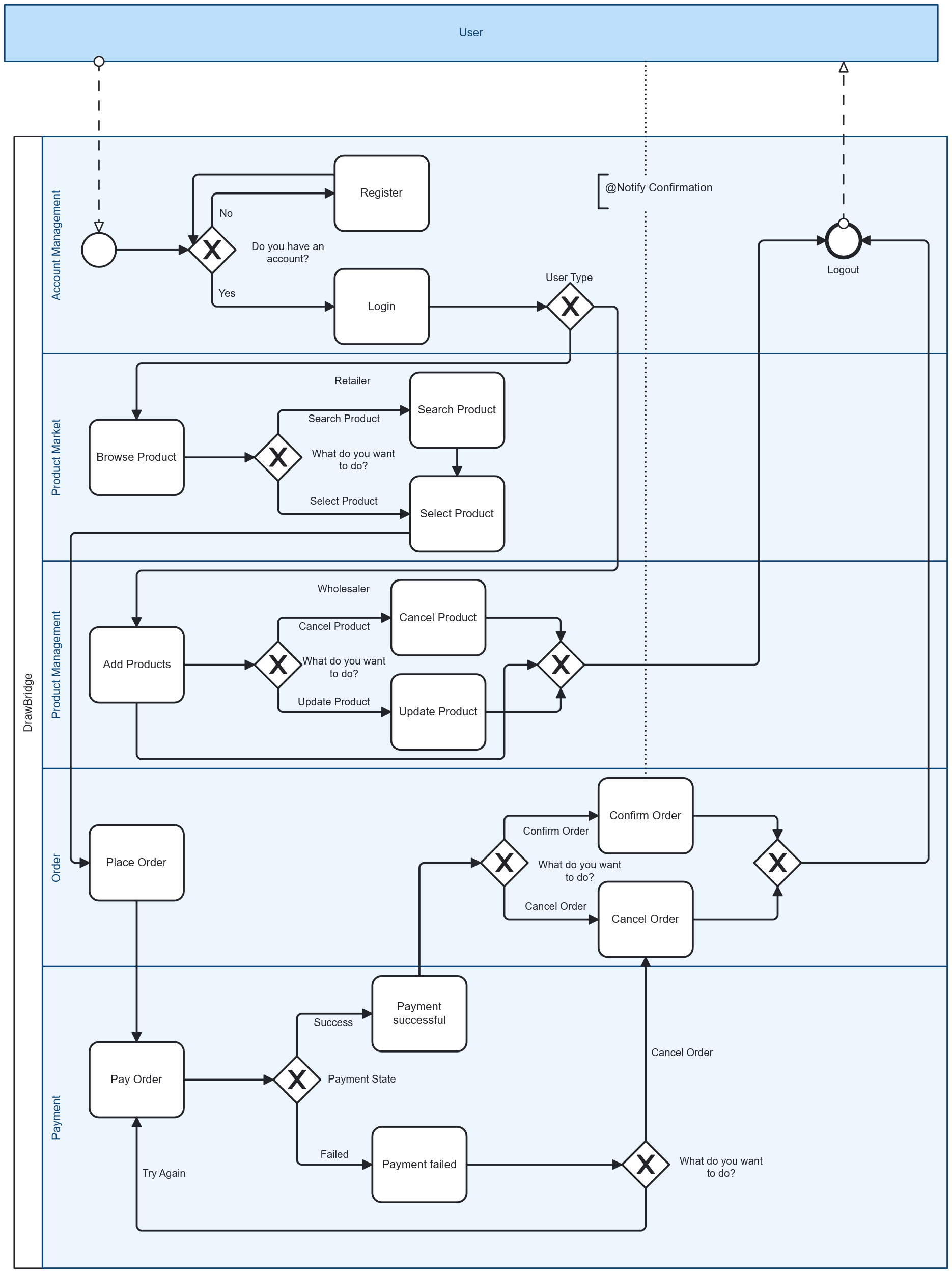
In this chapter, we will describe the software requirements specification (SRS) of our project. It outlines the functional and non-functional requirements that define the system’s behavior, performance, and constraints. This chapter also presents the overall system architecture, detailing the interactions between different modules and components. The purpose of this section is to provide a clear understanding of what the system is expected to do and the conditions under which it will operate.
Purpose
The Drawbridge Platform is a B2B e-commerce system that connects small business owners with wholesalers and manufacturers of consumer goods in a single online marketplace, allowing them to buy and manage stock via inventory management features available on the platform. This document specifies the requirements for the platform, covering the full system, including browsing, ordering, and inventory management.
The main purposes of the platform are summarized as follows:
-
Large Market Access: Offer a wide range of products directly from multiple distributors and wholesalers, giving users variety and competitive pricing in one place
-
Inventory Management: Provide business owners with tools to organize, track, and manage their stock levels in real time.
-
Automatic Restocking: Enable businesses to set rules for restocking so that products are reordered automatically when stock reaches a predefined threshold or by setting specific date and time for restocking by the user.
This SRS ensures that all stakeholders-including developers, testers, and end users-share a clear understanding of the system’s scope and requirements.
Document Conventions
-
The document follows guidelines provided by the project supervisor. formatting style chosen to ensure professional presentation and academic consistency. The font applied throughout the work is Times New Roman, with the following size conventions:
-
Headings: 18pt, Bold
-
Subtitles: 16pt, Bold
-
Body Text: 12pt
The layout has been structured to ensure clarity, consistency, and ease of reading across the document.
Intended Audience and Reading Suggestions
The primary audience for this document includes small to medium business owners who will use the Drawbridge platform to purchase products, manage their inventory, and simplify the process of restocking goods. It is also intended for wholesalers and distributors who will rely on the platform to display their catalogs, reach a broader customer base, and manage orders more effectively.
Product Scope
The Drawbridge Platform provides a unified marketplace that simplifies procurement for small businesses by offering access to thousands of products from multiple wholesalers and manufacturers in one place.
The platform’s core objectives include:
-
Consolidated Product Access: Businesses can browse and purchase products from various suppliers through a single application.
-
Competitive Pricing: Wholesalers compete within the platform, ensuring users benefit from favorable pricing.
-
Inventory Management Tools: Features such as automatic restocking and real-time inventory tracking help businesses manage stock efficiently.
-
Streamlined Ordering: Orders can be placed, tracked, and organized without needing multiple external systems.
By integrating these features, the Drawbridge Platform aligns with corporate goals of improving supply chain efficiency, reducing operational costs, and supporting small business growth through digital transformation.
References
Institute of Electrical and Electronics Engineers (IEEE). (n.d.). IEEE standards for software engineering and system design. IEEE Computer Society.
National Cybersecurity Authority (NCA). (2018). Essential cybersecurity controls (ECC). Kingdom of Saudi Arabia.
Saudi Authority for Data and Artificial Intelligence (SDAIA). (2021). Personal data protection law (PDPL). Kingdom of Saudi Arabia.
Saudi Ministry of Commerce. (2019). E-commerce law and consumer protection regulations. Kingdom of Saudi Arabia.
World Wide Web Consortium (W3C). (2018). Web Content Accessibility Guidelines (WCAG) 2.1. W3C Recommendation.
World Wide Web Consortium (W3C). (n.d.). Web standards.
Overall Description
Product Perspective
The Drawbridge Platform is a new, self-contained product designed as an integrated B2B e-commerce and inventory-management solution. It is not a follow-on release or an extension of any existing system; rather, it was developed from the ground up to address the limitations identified in current B2B marketplaces and inventory tools.
Existing systems in the region, such as Sary, Jomlah, and Tradeling, focus mainly on wholesale trading and product listings, but they lack advanced features such as automatic restocking, real-time inventory analytics, and full POS integration. Drawbridge was conceptualized to fill this gap by unifying wholesale procurement and inventory control into a single digital ecosystem tailored to the needs of small and medium-sized enterprises (SMEs).
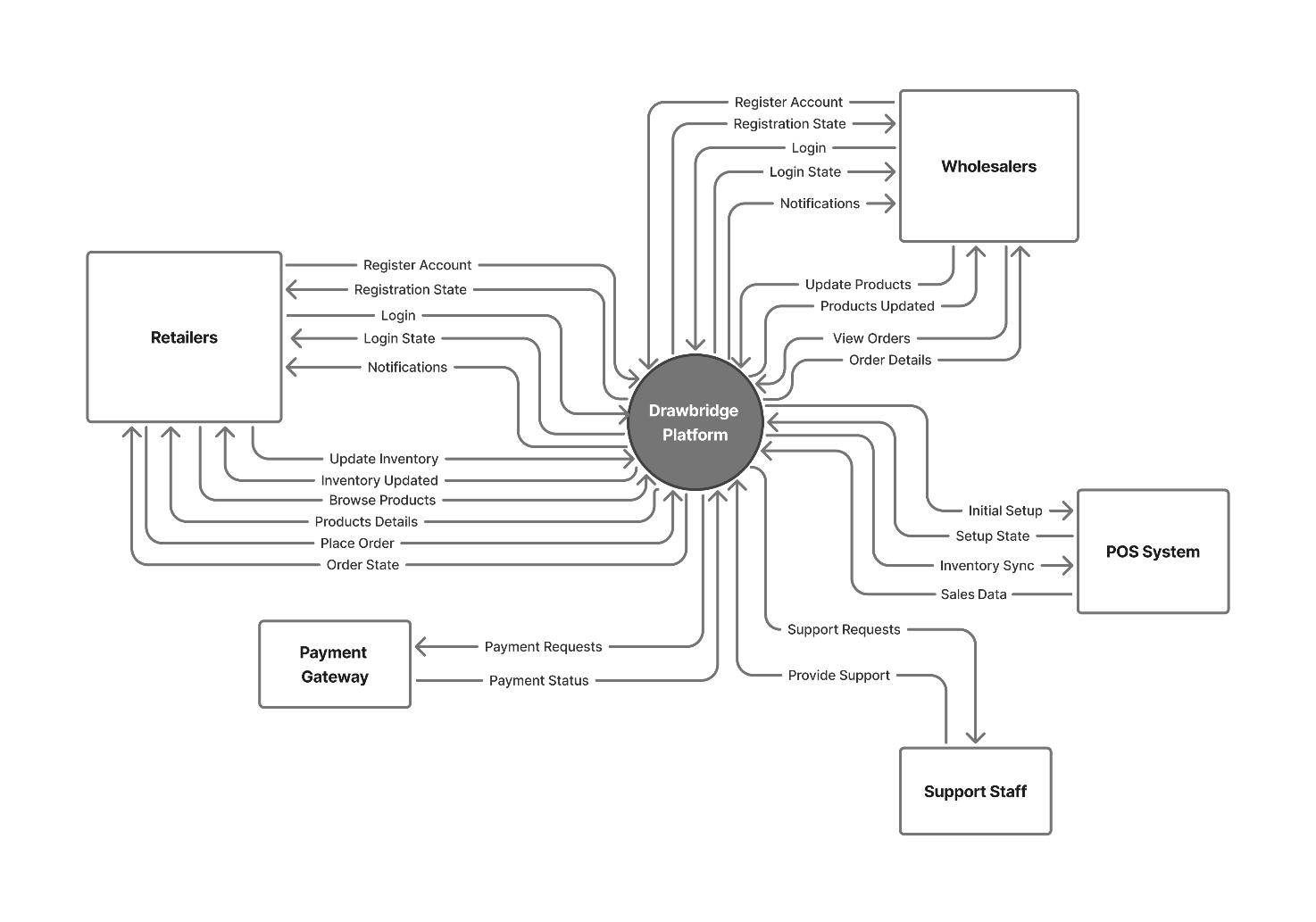
The system functions as an independent platform that bridges two main user groups:
-
Retailers/SMEs, who browse, order, and manage stock; and
-
Wholesalers/Manufacturers, who upload, manage, and sell their products.
Although the Drawbridge platform can integrate with external systems such as Point-of-Sale (POS) or Accounting Software through standard APIs, it primarily operates as a standalone web application. These interfaces allow synchronization of inventory data, order histories, and payment records, ensuring consistent and up-to-date information across all connected systems.
From a structural point of view, the platform follows a client-server architecture composed of three main layers:
-
User Interface Layer (Front-End): A web-based interface accessible through modern browsers for both retailers and wholesalers.
-
Application Layer (Back-End): Implements business logic for ordering, inventory automation, notifications, and user management.
-
Database Layer: Stores user profiles, product catalogs, orders, payments, and inventory data in a secure relational database.
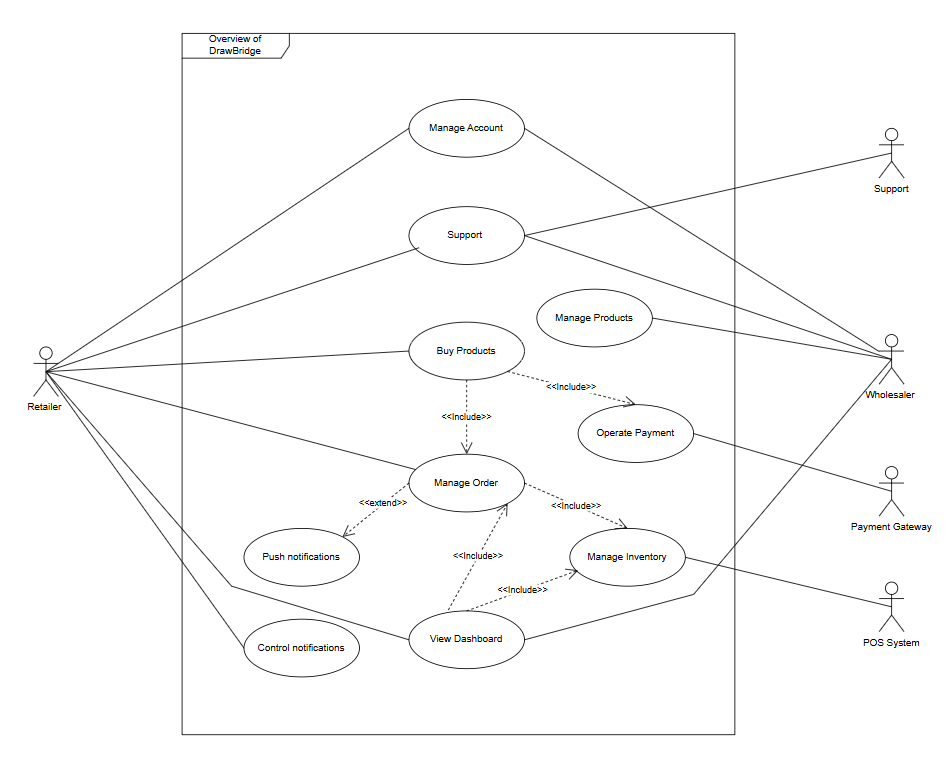
F1. Account Management
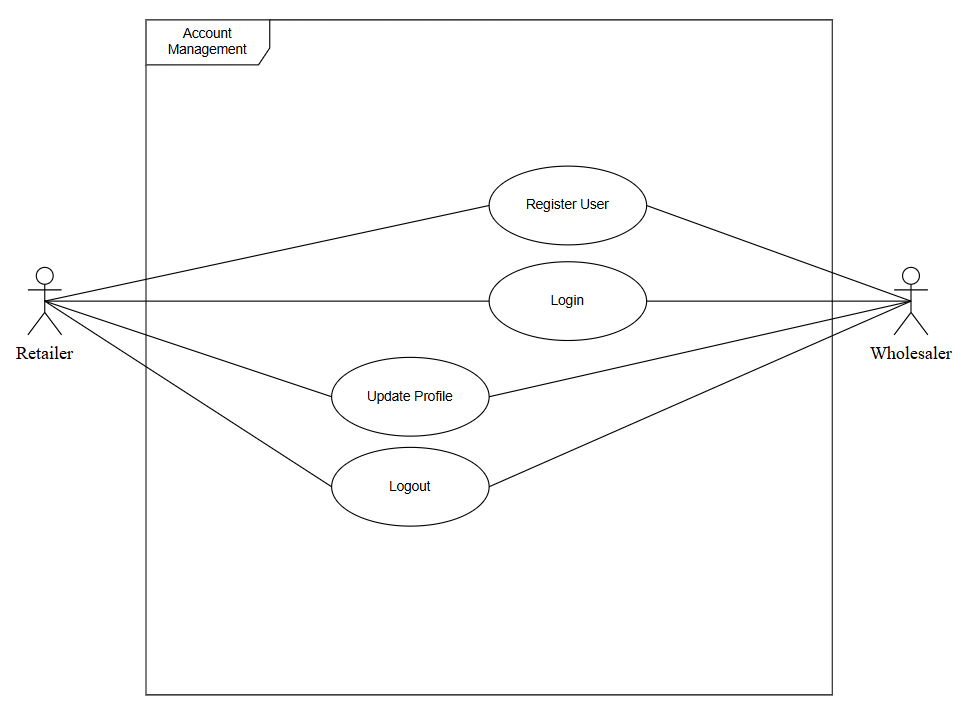
| F1.1 Register User | |
|---|---|
Aspect |
Description |
Actor |
Retailer Wholesaler |
Description |
Allow a new user to create an account. |
Data |
Name email password phone number address commercial register number |
Pre-Condition |
User not registered |
Output |
User Registered, “Account Registered” Message Appeared |
Trigger |
User clicks on "Register" |
Steps |
Fill the name, email, password, phone number, address and commercial register number fields Click on Submit System validates and creates an account |
Exception |
1.a Invalid Input 1.b Show Message "Invalid Input" 3.a Account exists 3.b Show Message "Account exists" |
| F1.2 Login | |
|---|---|
Aspect |
Description |
Actor |
Retailer Wholesaler |
Description |
Authenticates registered users. |
Data |
Email password |
Pre-Condition |
User already registered and logged out |
Output |
User logged in, Dashboard page opens |
Trigger |
User clicks on "Login" |
Steps |
Fill the email and password fields Click on “Submit” button System validates Redirect to dashboard |
Exception |
1.a Invalid Email format 1.b “Invalid Email” Message appears 3.a Incorrect credentials 3.b “Wrong email or password” Message appears 4.a Network error 4.b “Could not redirect” Message appears |
| F1.3 Update Profile | |
|---|---|
Aspect |
Description |
Actor |
Retailer Wholesaler |
Description |
Allow user to update account profile. |
Data |
Name Email Password phone number address commercial register number |
Pre-Condition |
User logged in |
Output |
Profile updated |
Trigger |
User clicks on "Edit Profile" |
Steps |
Profile data fields appear User modifies a data field User clicks on “Save changes” System check and updates the database |
Exception |
1.a Data fetch error 2.b “Could not load profile” Message appears 2.a Invalid data entry 2.b “Invalid data” Message appears 4.a Server unreachable 4.b “Server unreachable” Message appears |
| F1.4 Logout | |
|---|---|
Aspect |
Description |
Actor |
Retailer Wholesaler |
Description |
Ends user session securely. |
Data |
N/A |
Pre-Condition |
User logged in |
Output |
User Logged out successfully, User on the Login page |
Trigger |
User clicks "Logout" |
Steps |
Request sent to the server The Server ends the session User Redirected to login page |
Exception |
1.a Server unreachable 1.b “Server unreachable” Message appears 3.a Network error 3.b “Could not redirect” Message appears |
F2. Product Market
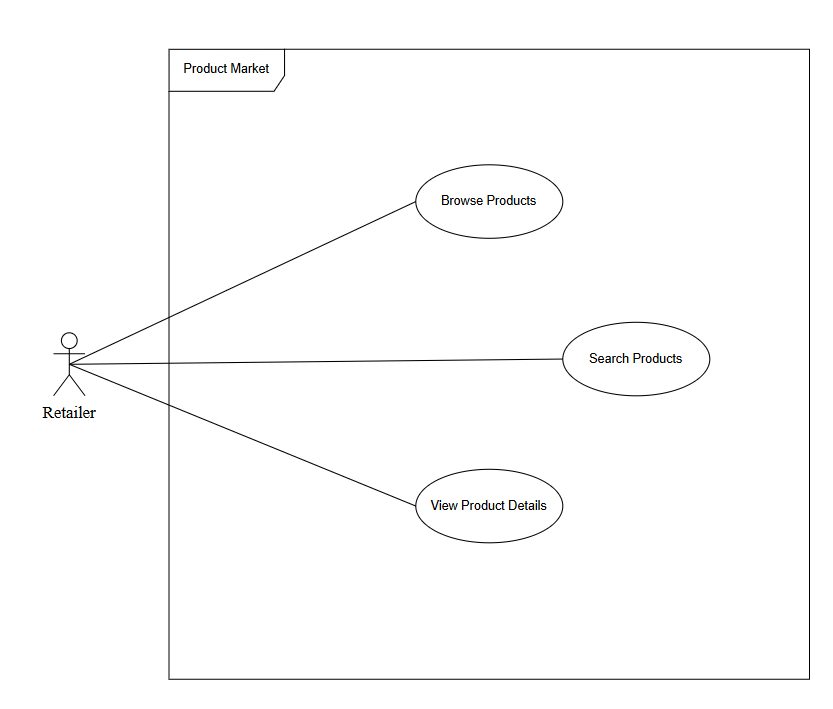
| F2.1 Browse Products | |
|---|---|
Aspect |
Description |
Actor |
Retailer |
Description |
View product listings by category. |
Data |
Category Sort Option |
Pre-Condition |
User logged in, User in the Marketplace page |
Output |
Products displayed based on the filters |
Trigger |
User clicks on "Filters" |
Steps |
User selects category and sort option Products list appears |
Exception |
2.a Network error 2.b “Could not load products” Message appears |
| F2.2 Search Products | |
|---|---|
Aspect |
Description |
Actor |
Retailer |
Description |
Allows Retailer to find specific products. |
Data |
Product name |
Pre-Condition |
User logged in, User in the Marketplace |
Output |
Matching products listed |
Trigger |
User clicks on “Search” |
Steps |
User writes keyword User clicks enter Results fetched |
Exception |
2.a Search field is empty 2.b “Empty field” Message appears 3.a Network error 3.b “Could not redirect” Message appears |
| F2.3 View Product Details | |
|---|---|
Aspect |
Description |
Actor |
Retailer |
Description |
View detailed information of a product. |
Data |
Product ID |
Pre-Condition |
Product exists |
Output |
Product info displayed |
Trigger |
User clicks on a product |
Steps |
Load product details page |
Exception |
1.a Product not found 1.b Show Message “Product not found” |
F3. Inventory Management
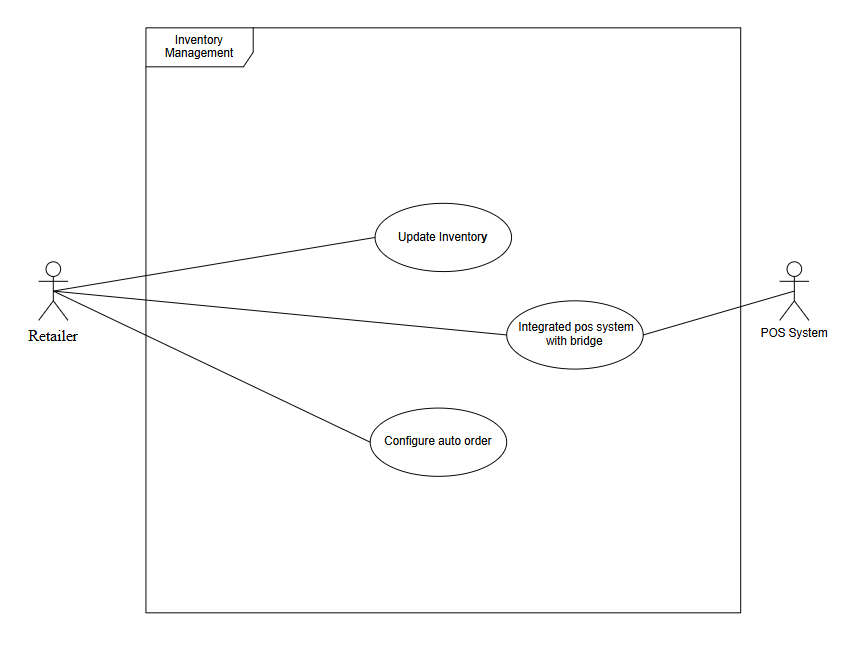
| F3.1 Update Inventory | |
|---|---|
Aspect |
Description |
Actor |
Retailer Drawbridge |
Description |
Allows the system or the retailer to update inventory items based on different triggers such as user edits, system events, or external integration |
Data |
Item ID Item name Item stock level Item restock config |
Pre-Condition |
User logged in and inventory record exists |
Output |
Inventory Updated |
Trigger |
A change event occurs (manual edit, system action, or external input) |
Steps |
1. Change request is initiated 2. System validates the data 3. Inventory record is updated 4. System logs the update |
Exception |
2.a Update failure due to invalid data 2.b “Update failed” message appears |
| F3.1.1 Manual Update Inventory | |
|---|---|
Aspect |
Description |
Actor |
Retailer |
Description |
Retailer manually updates an inventory item through the inventory page. |
Data |
1. Item ID 2. New item name (optional) 3. Updated stock level 4. New restock config (optional) |
Pre-Condition |
User logged in and on the Inventory page IF change is Manual |
Output |
Inventory item manually updated |
Trigger |
User clicks “Edit Item” and submits changes |
Steps |
1. Retailer opens the inventory item 2. Retailer edits item fields 3. System validates input 4. System applies the manual update |
Exception |
1.a Invalid data entry 1.b “Invalid data” Message appears |
| F3.1.2 Inventory Update from Order Completion | |
|---|---|
Aspect |
Description |
Actor |
Retailer |
Description |
System updates inventory automatically when an incoming order is successfully delivered |
Data |
1. Item ID 2. Ordered quantity 3. Updated stock amount 4. Auto restock configuration |
Pre-Condition |
Order is successfully completed and marked as delivered IF change comes from Order Completion |
Output |
Inventory increased according to delivered order |
Trigger |
System receives “Order Delivered” event |
Steps |
1. System identifies items in the completed order 2. System calculates new stock level 3. System updates inventory quantities 4. Inventory adjustment log created |
Exception |
2.a Order item mismatch 2.b “Inventory update failed” message logged |
| F3.1.3 Inventory Update from POS Sync | |
|---|---|
Aspect |
Description |
Actor |
POS System |
Description |
System automatically decreases inventory when POS reports an in-store sale. |
Data |
1. POS Vendor 2. Product ID 3. Sold quantity 4. Updated inventory level |
Pre-Condition |
POS system integration is active IF change comes from POS Sync |
Output |
Inventory decreased based on POS transaction |
Trigger |
POS sends “Sale Event” through API |
Steps |
1. POS sends sale report to the system 2. System validates POS credentials 3. System deducts sold quantity from inventory 4. System updates stock level and logs adjustment |
Exception |
3.a POS sync failure 3.b “POS sync failure” message appears |
| F3.2 Integrate POS System | |
|---|---|
Aspect |
Description |
Actor |
POS System |
Description |
Syncs POS data with Drawbridge. |
Data |
POS Vendor API Key Account ID |
Pre-Condition |
POS system available |
Output |
Linked POS account |
Trigger |
User clicks on “Config POS Integration” |
Steps |
Enter credentials Confirm connection |
Exception |
2.a Invalid API or timeout 2.b “Invalid API or timeout” Message appears |
| F3.3 Configure Auto Order | |
|---|---|
Aspect |
Description |
Actor |
Retailer |
Description |
Sets automatic restock thresholds. |
Data |
Product ID Minimum Threshold Reorder Quantity Payment Method |
Pre-Condition |
User in the Inventory page |
Output |
Auto order setup complete |
Trigger |
User clicks on item “Config Auto Order” |
Steps |
User fills the Product ID, Minimum Threshold, Reorder Quantity, Payment Method fields Save configuration |
Exception |
1.a Invalid data entry 1.b “Invalid data” Message appears |
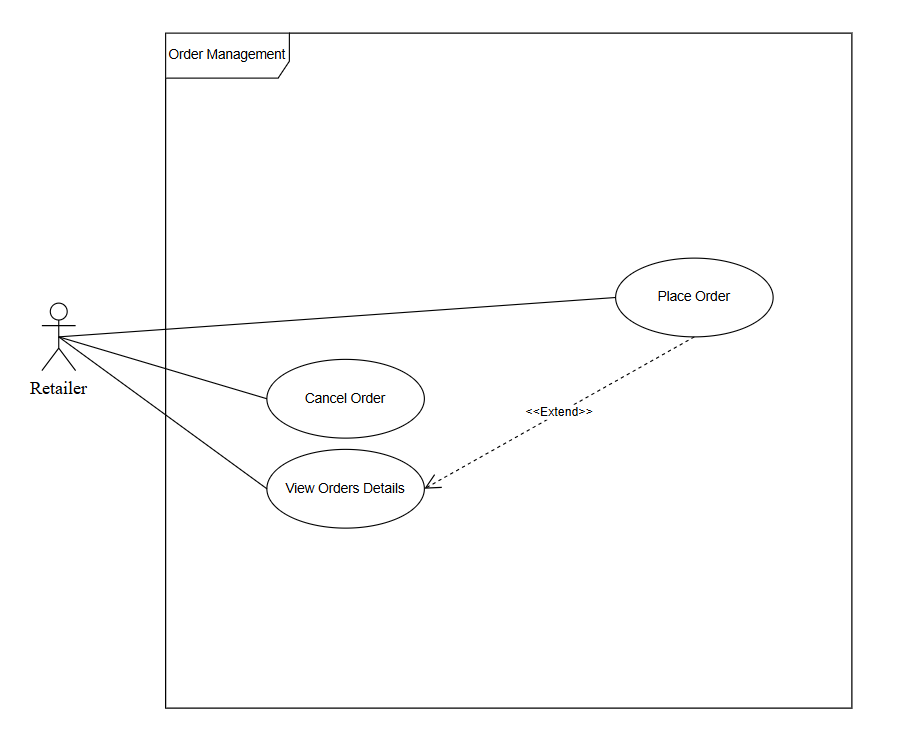
| F4.1 Place Order | |
|---|---|
Aspect |
Description |
Actor |
Retailer |
Description |
Orders products from wholesaler. |
Data |
Shipping Address Payment Method |
Pre-Condition |
User logged in |
Output |
Order confirmation |
Trigger |
User clicks "Place order" |
Steps |
User selects payment method and shipping address User confirms details System make payment and confirm order |
Exception |
3.a Payment failure 3.b “Payment failure” Message appears |
| F4.2 Cancel Order | |
|---|---|
Aspect |
Description |
Actor |
Retailer |
Description |
Cancels pending orders. |
Data |
Order ID |
Pre-Condition |
Order not shipped |
Output |
Order Cancelled, Cancellation success message |
Trigger |
User clicks "Cancel Order" |
Steps |
Request sent to server System Check order not shipped |
Exception |
2.a Order already shipped 2.b “Order already shipped” Message appear |
| F4.3 View Orders Details | |
|---|---|
Aspect |
Description |
Actor |
Retailer Wholesaler |
Description |
Displays orders history and details. |
Data |
N/A |
Pre-Condition |
Orders exist |
Output |
Orders details displayed |
Trigger |
User opens orders page |
Steps |
System fetch orders data |
Exception |
1.a Network error 1.b “Could load products” Message appears |
F5. Notifications
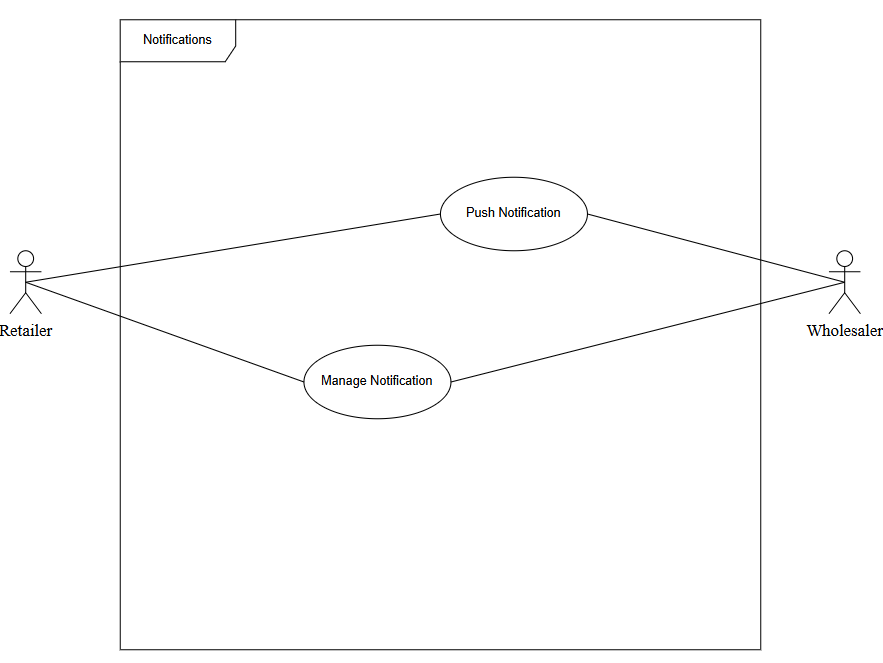
| F5.1 Push Notification | |
|---|---|
Aspect |
Description |
Actor |
Retailer |
Description |
Sends alerts for order or stock updates. |
Data |
User ID Notification Type Message Delivery Channel |
Pre-Condition |
Notification system active |
Output |
Alert displayed |
Trigger |
Event triggered (e.g., low stock) |
Steps |
System detects events Compose message Send to user |
Exception |
1.a: Event data missing. 1.b: Show Message "Event not recognized." 2.a: Message template unavailable. 2.b: Show Message "Unable to generate message." 3.a: Notification server down. 3.b: Show Message "Notification delivery failed." |
| F5.2 Manage Notifications | |
|---|---|
Aspect |
Description |
Actor |
Retailer |
Description |
Customizes alert preferences. |
Data |
Enabled Types (stock, order, promotion) Preferred Channel (app, email, phone) |
Pre-Condition |
User logged in |
Output |
Updated preferences |
Trigger |
User edits notification settings |
Steps |
Open settings Choose preferences Save |
Exception |
1.a: Settings page not found. 1.b: Show Message "Unable to load settings." 2.a: Invalid selection format. 2.b: Show Message "Invalid input." 3.a: Database update failed. 3.b: Show Message "Preferences could not be saved. |
F6. Dashboard
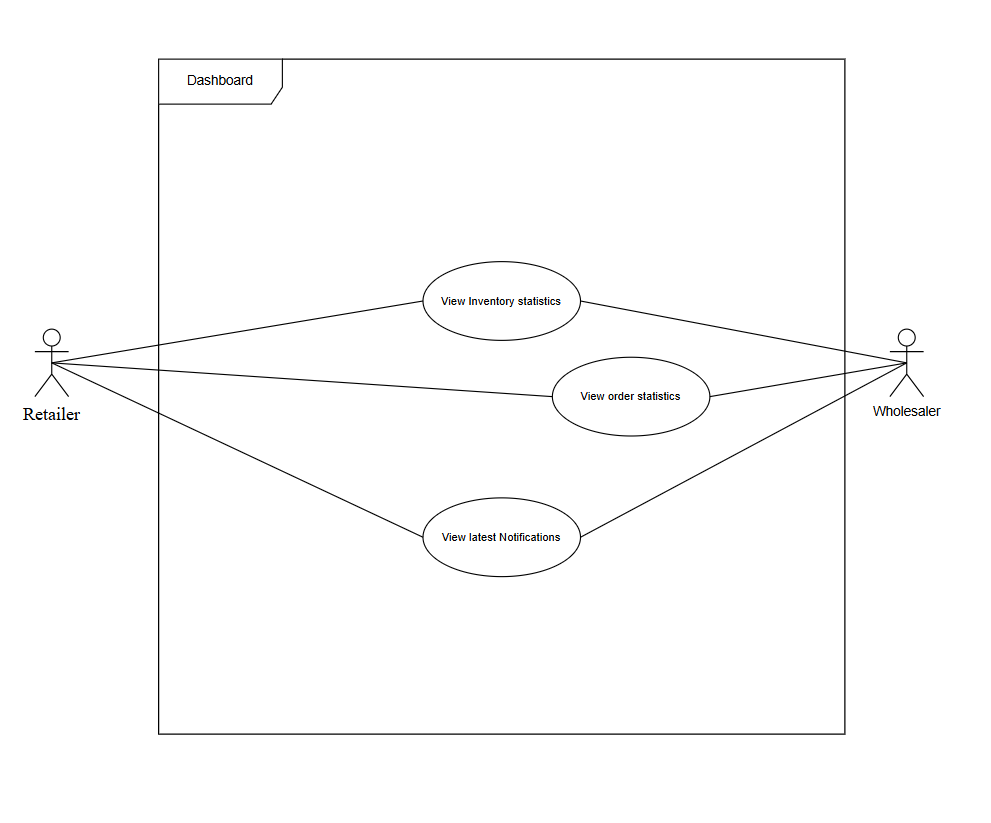
| F6.1 View Inventory Statistics | |
|---|---|
Aspect |
Description |
Actor |
Retailer Wholesaler |
Description |
Displays current stock insights. |
Data |
Date Range Group Option KPIs (stock levels, low-stock items, turnover rate) |
Pre-Condition |
User logged in |
Output |
Inventory summary |
Trigger |
User opens dashboard |
Steps |
Load dashboard Display charts |
Exception |
1.a: Database not responding. 1.b: Show Message "Failed to load dashboard data." 2.a: Chart rendering error. 2.b: Show Message "Unable to display statistics." |
| F6.2 View Order Statistics | |
|---|---|
Aspect |
Description |
Actor |
Retailer Wholesaler |
Description |
Shows order analytics. |
Data |
Date Range Status Filter KPIs (total order, pending, completed) |
Pre-Condition |
User logged in |
Output |
Order stats chart |
Trigger |
User selects "Orders" tab |
Steps |
Access dashboard Display order data |
Exception |
1.a: Dashboard failed to load. 1.b: Show Message "Dashboard unavailable." 2.a: No order records found. 2.b: Show Message "No data available. |
| F6.3 View Latest Notifications | |
|---|---|
Aspect |
Description |
Actor |
Retailer Wholesaler |
Description |
Lists recent alerts. |
Data |
Pagination Type Filter |
Pre-Condition |
User logged in |
Output |
Notification feed |
Trigger |
User checks dashboard |
Steps |
Load dashboard Display notifications |
Exception |
1.a: Dashboard failed to load. 1.b: Show Message "Unable to access dashboard." 2.a: No notifications found. 2.b: Show Message "No notifications to display. |
F7. Support
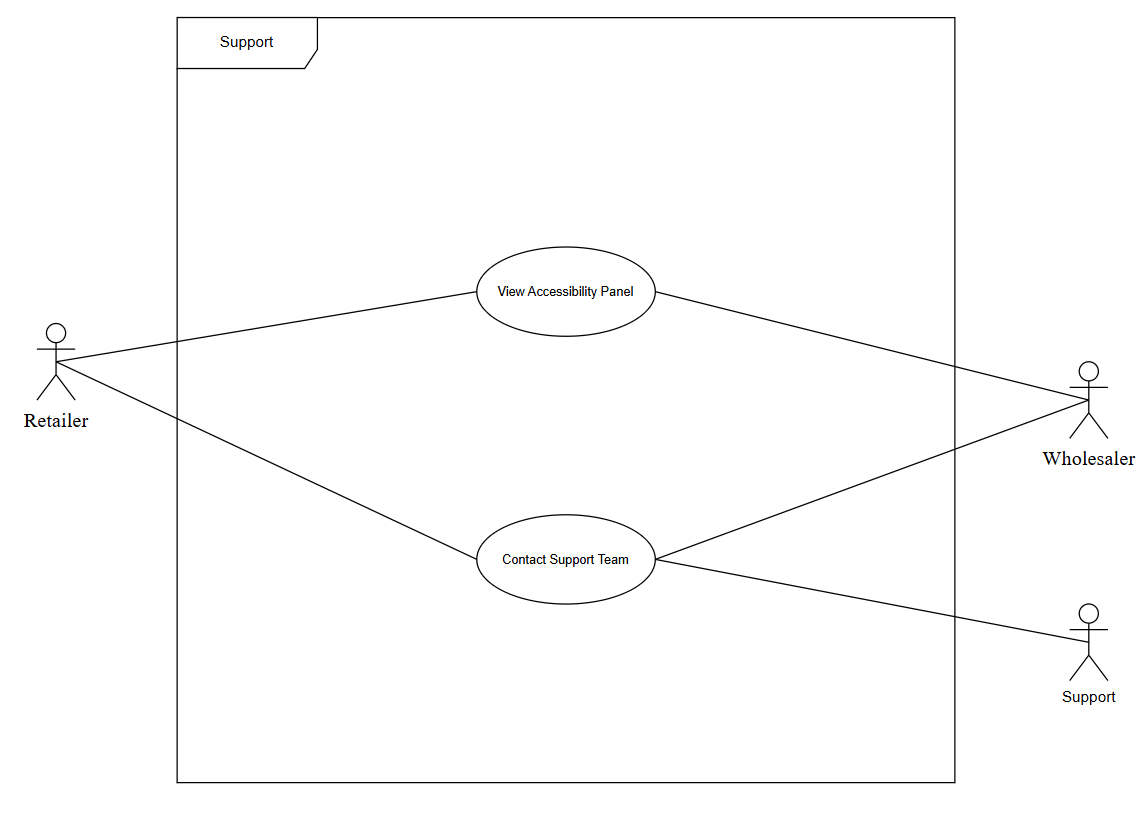
| F7.1 View Accessibility Panel | |
|---|---|
Aspect |
Description |
Actor |
Retailer Wholesaler |
Description |
Shows help guides and FAQs. |
Data |
Topic/Keyword |
Pre-Condition |
User logged in |
Output |
Help panel displayed |
Trigger |
User opens "Support" |
Steps |
Access support Browse resources |
Exception |
1.a: Support module not responding. 1.b: Show Message "Support unavailable." 2.a: Data failed to load. 2.b: Show Message "Unable to load resources. |
| F7.2 Contact Support Team | |
|---|---|
Aspect |
Description |
Actor |
Retailer Wholesaler Support |
Description |
Enables contacting support for help. |
Data |
Subject Message Email Phone Attachment |
Pre-Condition |
User logged in |
Output |
Support ticket created |
Trigger |
User submits query |
Steps |
Fill form Submit message |
Exception |
1.a: Required fields empty. 1.b: Show Message "All fields are required." 2.a: Server error. 2.b: Show Message "Failed to send message." |
F8. Payment Management
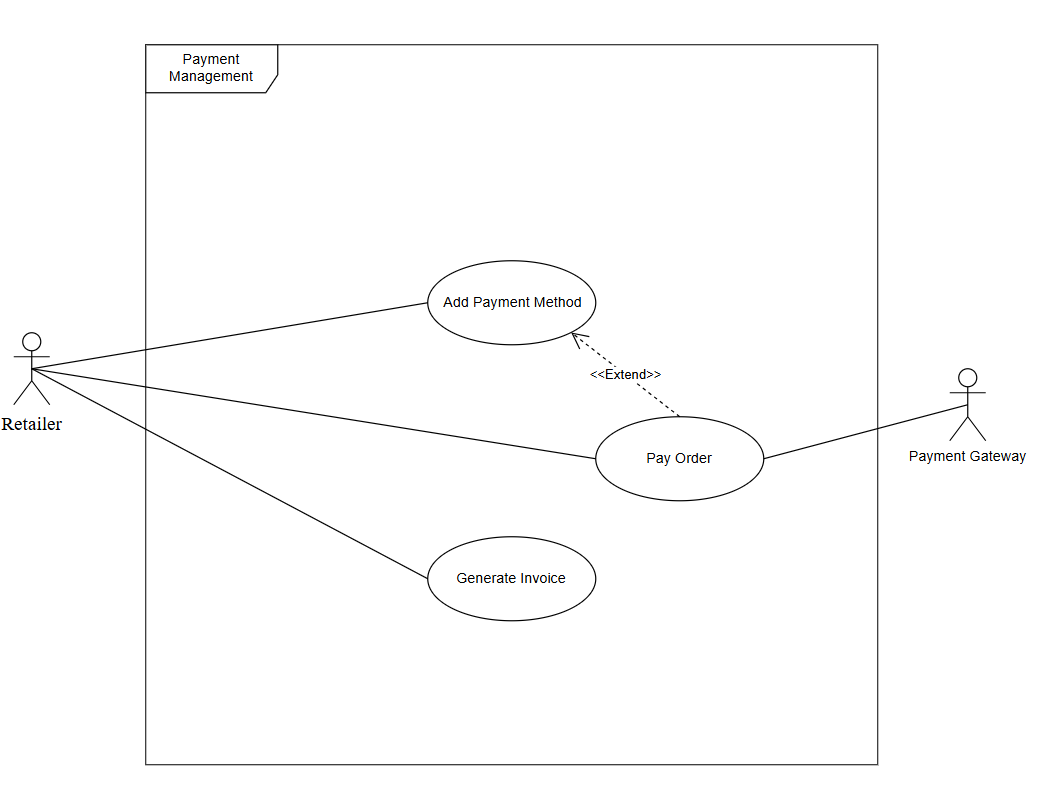
| F8.1 Add Payment Method | |
|---|---|
Aspect |
Description |
Actor |
Retailer |
Description |
Adds or updates payment info. |
Data |
cardholder Name Card Number Token Expiry Date CVV (Not Stored) Billing Address. |
Pre-Condition |
User logged in |
Output |
Payment method saved |
Trigger |
User adds payment method |
Steps |
Go to settings Enter info Save |
Exception |
1.a: Settings page not available. 1.b: Show Message "Unable to open payment settings." 2.a: Invalid card info entered. 2.b: Show Message "Invalid payment details." 3.a: Database error. 3.b: Show Message "Failed to save payment method." |
| F8.2 Pay Order | |
|---|---|
Aspect |
Description |
Actor |
Retailer Payment Gateway |
Description |
Processes payment for an order. |
Data |
Order ID Amount Payment Method Token OTP/3DS |
Pre-Condition |
Order placed |
Output |
Payment receipt |
Trigger |
User confirms purchase |
Steps |
Confirm payment System validates Complete transaction |
Exception |
1.a: Order ID missing. 1.b: Show Message "Invalid order reference." 2.a: Payment validation failed. 2.b: Show Message "Payment authentication error." 3.a: Payment declined. 3.b: Show Message "Transaction failed." |
| F8.3 Generate Invoice | |
|---|---|
Aspect |
Description |
Actor |
Retailer |
Description |
Creates downloadable invoice after payment. |
Data |
Order ID Billing Info Address |
Pre-Condition |
Payment successful |
Output |
PDF invoice |
Trigger |
Payment confirmed |
Steps |
Payment done Generate invoice |
Exception |
1.a: Payment record not found. 1.b: Show Message "Payment details missing." 2.a: File generation error. 2.b: Show Message "Unable to create invoice. |
F9. Product Management
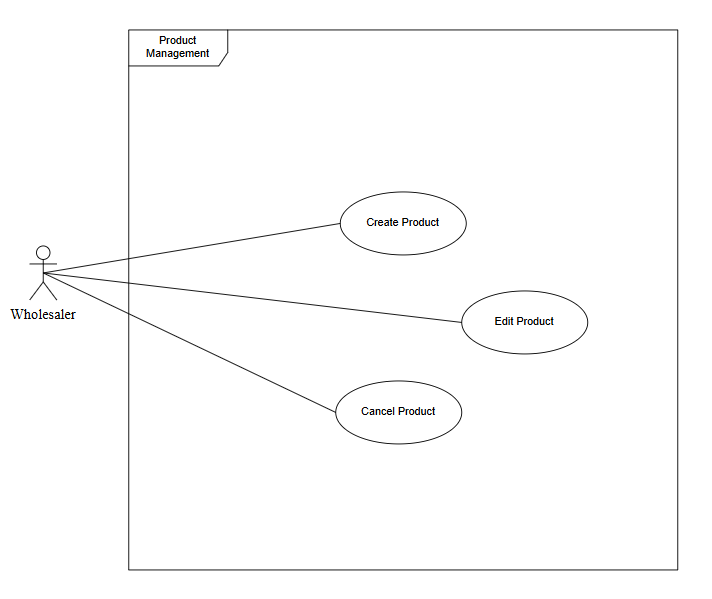
| F9.1 Create Product | |
|---|---|
Aspect |
Description |
Actor |
Wholesaler |
Description |
Adds new product listing. |
Data |
Product Name Category, Brand Unit, Price MOQ Stock Description Images Attributes (SKU, dimensions, weight, color, warranty) |
Pre-Condition |
Wholesaler logged in |
Output |
Product added |
Trigger |
User clicks "Add Product" |
Steps |
Enter details Upload images Submit |
Exception |
1.a: Required data missing. 1.b: Show Message "Fill all required fields." 2.a: Image upload failed. 2.b: Show Message "Unable to upload images." 3.a: Database error. 3.b: Show Message "Product creation failed. |
| F9.2 Edit Product | |
|---|---|
Aspect |
Description |
Actor |
Wholesaler |
Description |
Updates existing product info. |
Data |
Product ID Updated Product Fields (stock, price, description, images, category) |
Pre-Condition |
Product exists |
Output |
Product updated |
Trigger |
User edits listing |
Steps |
Open product Modify info Save |
Exception |
1.a: Product not found. 1.b: Show Message "Product not found." 2.a: Invalid input data. 2.b: Show Message "Invalid field values." 3.a: Save failed. 3.b: Show Message "Unable to update product." |
| F9.3 Delete Product | |
|---|---|
Aspect |
Description |
Actor |
Wholesaler |
Description |
Removes a product listing. |
Data |
Product ID |
Pre-Condition |
Product exists |
Output |
Product deleted |
Trigger |
User selects "Delete" |
Steps |
Confirm deletion Remove entry |
Exception |
1.a: Product linked to active orders. 1.b: Show Message "Cannot delete product linked to active orders." 2.a: Database error. 2.b: Show Message "Failed to delete product. |
User Classes and Characteristics
The Drawbridge platform serves multiple user classes, each with distinct needs and levels of interaction with the system:
The Retailer / Buyer is a high-priority user class. These are small to medium-sized business owners who use the platform to browse, order, and manage inventory. They have basic to moderate technical expertise. Their privileges and functions include being able to browse products, place orders, manage inventory, configure auto-restocking, and track payments.
The Wholesaler / Supplier is also a high-priority user class. These are businesses that provide products through the platform. They create listings and manage stock and orders. They have moderate technical expertise. Their privileges and functions include being able to upload and manage products, view and fulfill orders, track payments, and update product details.
The Support Staff is a medium-priority user class. They provide customer and technical support to users. They have moderate technical expertise. Their privileges and functions include accessing the support dashboard, responding to user queries, and managing tickets or issues.
The primary user classes are Retailers and Wholesalers, as their interaction forms the core operational flow of the system. Administrators and support users are secondary but essential for maintenance and service quality.
Operating Environment
The Drawbridge platform is designed to operate in a web-based and cross-platform environment, ensuring accessibility and scalability.
Hardware Platform: Standard computers or laptops with internet access; mobile devices (smartphones, tablets).
Operating Systems: Microsoft Windows 10 or later, macOS, Linux, Android, and iOS (for browser access).
Supported web browsers: Google Chrome, Microsoft Edge, Mozilla Firefox, and Safari (latest versions).
Server Environment: Cloud-hosted backend using scalable infrastructure (e.g., AWS or Azure).
Database: Relational Database Management System (e.g., MySQL or PostgreSQL).
Development Environment: IntelliJ IDEA / Visual Studio Code for backend and frontend development.
Other Tools: Trello (task management), Webex (team communication), and Figma (UI/UX design).
Design and Implementation Constraints
-
Programming Languages: The backend will use Java, and the frontend uses React.js.
-
Database: Must use an SQL-based database such as MySQL or PostgreSQL.
-
Standards: Follow RESTful API design for backend communication.
-
Security: Must comply with standard encryption (HTTPS, SSL/TLS).
-
Regulatory: Must comply with local data protection and e-commerce regulations.
-
Integration: The system must support future integration with POS systems for real-time inventory synchronization.
-
Development Methodology: Agile methodology with iterative sprint cycles.
-
Performance: The system must support concurrent users without major latency.
-
Scalability Constraint: Initial version optimized for SMEs with moderate traffic.
User Documentation
The following documentation components will be provided with the software:
-
User Manual: Explains system features, navigation, and operations for retailers and wholesalers.
-
Quick Start Guide: Step-by-step setup instructions for new users.
-
Online Help / FAQs: Integrated help center within the web interface.
Assumptions and Dependencies
The successful development and operation of the Drawbridge platform rely on several key assumptions and dependencies:
Assumptions
-
Internet Connectivity: Users (retailers, wholesalers, administrators, support staff) will have reliable internet access to utilize the web-based platform.
-
Standard Browser Compatibility: Users will access the platform using modern, up-to-date web browsers that support current web technologies.
-
Wholesaler Participation: There will be a sufficient number of wholesalers and manufacturers willing to onboard and list their products on the Drawbridge platform.
-
User Technical Proficiency: Retailers and wholesalers will possess basic computer literacy and be able to navigate a web-based e-commerce platform.
-
Data Accuracy: Wholesalers will provide accurate and up-to-date product information, pricing, and stock levels.
-
Third-Party Service Availability: Any integrated third-party services (e.g., payment gateways, cloud hosting providers) will maintain their service levels and APIs.
Dependencies
-
Cloud Hosting Provider: The platform is dependent on a chosen cloud provider (e.g., AWS, Azure) for server infrastructure, scalability, and reliability.
-
Database System: The system relies on a robust SQL-based database (MySQL or PostgreSQL) for data storage and retrieval.
-
Payment Gateway Provider: Integration with a secure and reliable payment gateway is crucial for processing transactions.
-
External APIs for POS Integration: Future integration with various POS systems will depend on the availability and documentation of their respective APIs.
-
Development Tools and Environments: The development team is dependent on the specified tools (IntelliJ IDEA, Visual Studio Code, Figma, Trello, Webex) for efficient development and collaboration.
-
Security Standards and Protocols: Adherence to industry-standard security protocols (HTTPS, SSL/TLS) is dependent on their continued effectiveness and evolution.
-
Regulatory Compliance: The platform’s operation is dependent on compliance with local data protection and e-commerce regulations, which may evolve over time.
External Interface Requirements
User Interfaces
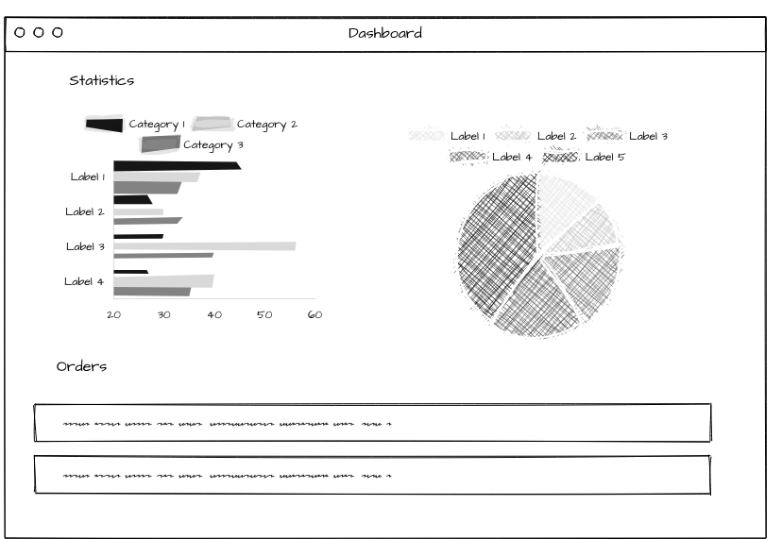
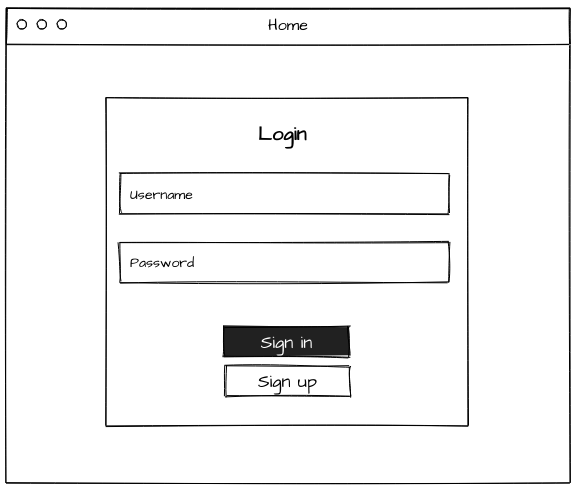
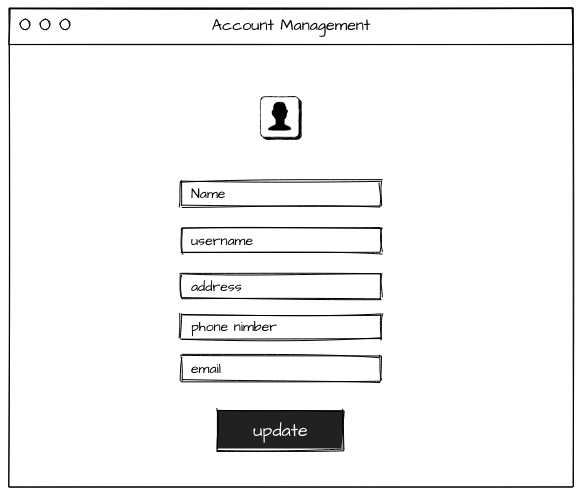
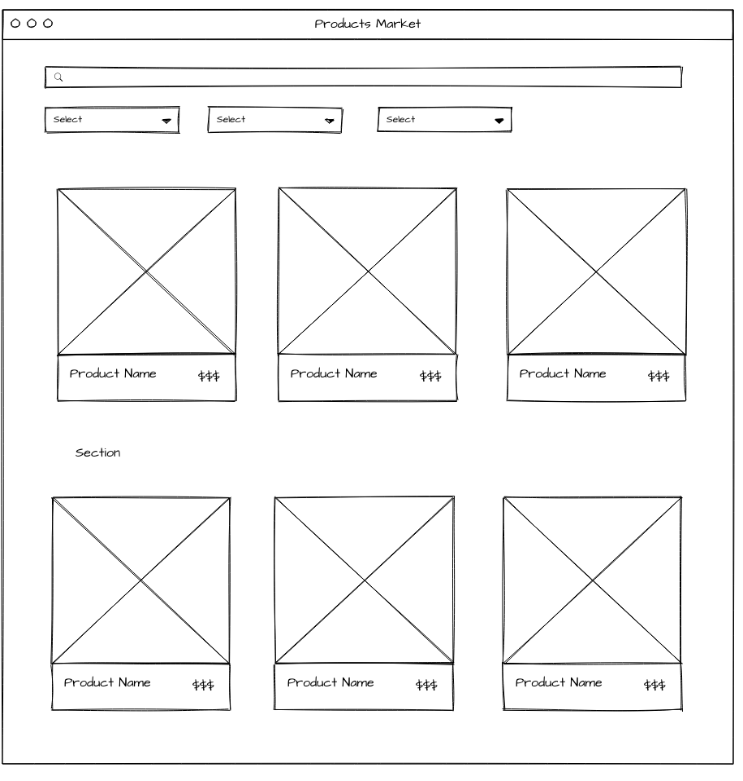
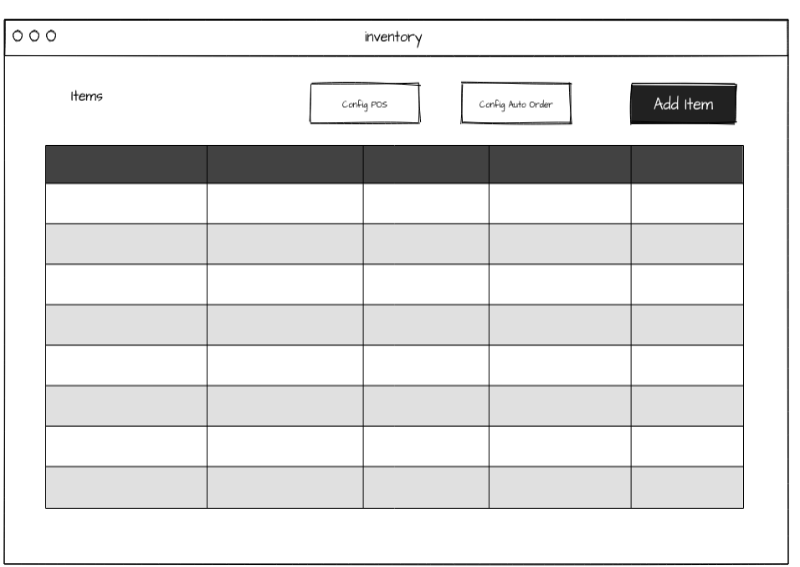
The Drawbridge platform will provide intuitive and user-friendly web-based interfaces for its different user classes: Retailers, Wholesalers, System Administrators, and Support Staff. The design will adhere to modern UI/UX principles, focusing on ease of navigation, clarity, and responsiveness across various devices.
-
General GUI Standards:
-
Consistent Layout: A consistent header, footer, and navigation menu will be present across all main sections.
-
Responsive Design: The interface will be optimized for different screen sizes (desktops, laptops, tablets, smartphones) to ensure accessibility and usability on various devices.
-
Branding: The Drawbridge logo and brand colors will be consistently applied throughout the interface.
-
Accessibility: Adherence to WCAG (Web Content Accessibility Guidelines) standards to ensure usability for individuals with disabilities.
-
Screen Layout Constraints:
-
Dashboard: A personalized dashboard for each user role, providing a quick overview of relevant information (e.g., order status for retailers, new product requests for wholesalers, system health for administrators).
-
Product Listing Pages: Grid or list view for products with clear images, names, prices, and quick-view options. Filtering and sorting capabilities will be prominent.
-
Product Detail Pages: Comprehensive information including detailed descriptions, specifications, multiple images, pricing tiers, and supplier details.
-
Shopping Cart/Checkout: A clear, multi-step process for reviewing items, applying discounts, selecting shipping options, and completing payment.
-
Inventory Management Interface: Tables with editable fields for stock levels, reorder points, and supplier information. Visual indicators for low stock.
-
Order Management Interface: Detailed tables displaying order ID, status, date, customer/supplier information, and action buttons (e.g., "View Details," "Update Status").
-
Account Settings: Forms for updating profile information, managing passwords, and configuring notification preferences.
-
Standard Buttons and Functions:
-
Call-to-Action Buttons: Clearly labeled buttons for primary actions (e.g., "Add to Cart," "Place Order," "Save," "Submit").
-
Navigation: Standard navigation elements like "Home," "Dashboard," "Products," "Orders," "Inventory," "Support."
-
Search Bar: A prominent search bar on all major pages for quick access to products, orders, or information.
-
Help Icon: An easily accessible help icon or link on every screen, leading to the online help center.
-
Keyboard Shortcuts: Common keyboard shortcuts for navigation and actions will be supported where appropriate (e.g., Tab for form navigation).
-
Error Message Display Standards:
-
Clear and Concise: Error messages will be easy to understand and provide actionable advice.
-
Contextual: Messages will appear near the relevant input field or section.
-
Non-intrusive: Error notifications will be designed to inform without disrupting the user experience excessively.
-
Validation: Real-time input validation will provide immediate feedback to users.
Hardware Interfaces
The Drawbridge platform, being a web-based application, primarily interacts with hardware through standard web technologies and the user’s operating system. Direct hardware interfaces are minimal, but the system is designed to be compatible with a range of devices.
-
Supported Device Types:
-
Client-Side:
-
Desktop/Laptop Computers: Standard PCs and Macs with internet access, keyboards, and pointing devices (mouse, trackpad).
-
Mobile Devices: Smartphones and tablets (iOS and Android) with touchscreens and cellular/Wi-Fi connectivity.
-
Server-Side:
-
Cloud Servers: Virtual machines or containerized environments provided by cloud hosting services (e.g., AWS EC2 instances, Azure Virtual Machines). These include standard server hardware components like CPUs, RAM, and storage, managed by the cloud provider.
-
Nature of Data and Control Interactions:
-
Input Devices: Keyboard and mouse for desktop users; touch input for mobile users. Data input (text, numbers) and control signals (clicks, taps, scrolls) are handled by the browser and operating system.
-
Output Devices: Displays (monitors, screens) for visual output; speakers for audio notifications (if implemented).
-
Network Interfaces: Both client and server hardware will utilize network interface cards (NICs) for internet connectivity, enabling communication via standard network protocols.
-
Communication Protocols:
-
HTTP/HTTPS: All client-server communication will occur over HTTP, secured with HTTPS for data encryption during transit.
-
TCP/IP: The underlying network communication will rely on the TCP/IP suite.
-
Wireless Protocols: Wi-Fi (802.11 standards) and cellular data (4G/5G) for mobile device connectivity.
Software Interfaces
The Drawbridge platform will interact with various software components, both internal and external, to deliver its full functionality. These interfaces ensure data flow, system integration, and adherence to established software ecosystems.
-
Internal Software Components:
-
Frontend (React.js): Communicates with the backend API to send user requests and receive data for display.
-
Backend (Java): Exposes RESTful APIs for frontend communication, handles business logic, and interacts with the database.
-
Database (MySQL/PostgreSQL): Stores all application data (user profiles, product catalogs, orders, payments, inventory). The backend interacts with the database using JDBC (Java Database Connectivity) or an ORM (Object-Relational Mapping) framework.
-
External Software Components:
-
Operating Systems: The client-side application runs within web browsers on various operating systems (Windows, macOS, Linux, Android, iOS). The server-side application runs on a Linux-based operating system within the cloud environment.
-
Web Browsers: The primary user interface is rendered within standard web browsers (Google Chrome, Microsoft Edge, Mozilla Firefox, Safari).
-
Payment Gateway APIs: Integration with third-party payment gateways (e.g., Stripe, PayPal) for secure processing of online payments. The system will send transaction details and receive payment confirmation/status via their APIs.
-
Point-of-Sale (POS) Systems (Future Integration): The platform is designed to support future integration with various POS systems. This will involve using their respective APIs to synchronize inventory levels, sales data, and potentially order information.
-
Cloud Services: Utilizes cloud provider services for various functionalities, such as:
-
Computer Services: Virtual machines or containers for hosting the backend application.
-
Database Services: Managed database services.
-
Storage Services: Object storage for product images and other media files.
-
Load Balancers: For distributing incoming traffic across multiple server instances.
-
Monitoring and Logging Tools: For system health and performance tracking.
-
Data Items and Messages:
-
Requests/Responses: JSON-formatted data for API calls between frontend and backend.
-
Database Queries: SQL queries for interacting with the database.
-
Payment Tokens/Transaction IDs: Secure tokens and identifiers exchanged with payment gateways.
-
Email Content: Text and HTML for automated email notifications.
-
Log Data: System events, errors, and user actions recorded for monitoring and debugging.
-
Communication Nature:
-
RESTful APIs: The primary communication mechanism between the frontend and backend, and with many external services.
-
Database Connections: Persistent connections from the backend to the database.
-
Asynchronous Messaging: Potentially for notifications or background tasks to improve performance.
Communications Interfaces
The Drawbridge platform relies heavily on robust communication interfaces to ensure seamless interaction between users, system components, and external services. These requirements define how data is transmitted, secured, and synchronized.
-
Network Protocols:
-
HTTP/HTTPS: All client-server communication will be secured using HTTPS (Hypertext Transfer Protocol Secure) to encrypt data in transit. This is critical for protecting sensitive user data, payment information, and business transactions.
-
TCP/IP: The fundamental protocol suite for internet communication, ensuring reliable data transfer.
-
DNS: Domain Name System for resolving domain names to IP addresses.
-
Message Formatting:
-
JSON (JavaScript Object Notation): The primary format for data exchange between the frontend, backend, and most external APIs due to its lightweight nature and human-readability.
-
XML (Extensible Markup Language): May be used for specific integrations with legacy systems or certain payment gateways if required, though JSON is preferred.
-
Email Format: Standard email formats (plain text and HTML) for notifications and communications.
-
Communication Standards:
-
RESTful API Design: The backend will expose RESTful APIs, adhering to principles such as statelessness, client-server separation, and uniform interface.
-
OAuth 2.0: For secure authorization and authentication with external services if required for integrations.
-
SMTP/IMAP: For email sending and potentially receiving (e.g., for support inquiries).
-
Communication Security and Encryption:
-
SSL/TLS (Secure Sockets Layer/Transport Layer Security): Essential for encrypting all data transmitted over HTTPS, protecting against eavesdropping and tampering.
-
Data Encryption at Rest: Sensitive data stored in the database (e.g., payment details, user passwords) will be encrypted using industry-standard encryption algorithms.
-
Secure API Keys/Tokens: API keys and authentication tokens for external service integrations will be securely managed and transmitted.
-
Firewalls and Network Security: Cloud infrastructure will be configured with firewalls and other network security measures to restrict unauthorized access.
-
Data Transfer Rates:
-
The system should be optimized for efficient data transfer, minimizing latency for common operations such as product browsing, order placement, and inventory updates.
-
Image and media content will be optimized for web delivery to ensure fast loading times.
-
Synchronization Mechanisms:
-
Real-time Updates: For critical data like inventory levels, the system will aim for near real-time synchronization, especially with integrated POS systems (future).
-
Batch Processing: For less time-sensitive data, batch updates or scheduled synchronization jobs may be used (e.g., daily sales reports to accounting software).
-
Web-hooks: May be utilized by external services to notify the Drawbridge platform of events (e.g., payment confirmation) for immediate processing.
System Features
This section details the functional requirements of the Drawbridge platform, organized by the major services it provides. Each feature is described with its priority, stimulus, or response sequences, and specific functional requirements. The features listed here correspond to the "Proposed system features" outlined in Chapter 1.
Account Management
This feature allows users (retailers, wholesalers, administrators) to create new accounts, log in, manage their profiles, and securely log out. It is a high priority feature as it is fundamental for user access and system security.
-
REQ-1.1: The system shall allow new users to register by providing a unique email address, password, and relevant business information.
-
REQ-1.2: The system shall enforce strong password policies (e.g., minimum length, complexity requirements).
-
REQ-1.3: The system shall securely store user passwords using hashing and salting techniques.
-
REQ-1.4: The system shall allow registered users to log in using their email and password.
-
REQ-1.5: The system shall provide a "Forgot Password" functionality to allow users to reset their passwords via email verification.
-
REQ-1.6: The system shall allow authenticated users to update their profile information (e.g., business name, contact details, shipping address).
-
REQ-1.7: The system shall allow users to change their password after successful authentication.
-
REQ-1.8: The system shall terminate a user’s session upon explicit logout or after a period of inactivity.
-
REQ-1.9: The system shall differentiate between user roles (Retailer, Wholesaler, Administrator, Support Staff) and grant appropriate access privileges.
-
REQ-1.10: The system shall display clear error messages for invalid registration or login attempts.
Product Market
This feature provides a central marketplace where retailers can discover products by browsing or searching, view detailed item information, and manage their shopping cart through to final checkout. This is a high-priority feature, central to the platform’s core offering.
-
REQ-2.1: The system shall display a comprehensive catalog of products available from various wholesalers.
-
REQ-2.2: The system shall provide advanced search capabilities by product name, category, brand, and supplier.
-
REQ-2.3: The system shall allow filtering products by price range, availability, and other relevant attributes.
-
REQ-2.4: The system shall display detailed product information, including images, descriptions, specifications, unit pricing, and available stock.
-
REQ-2.5: The system shall allow retailers to add products to a shopping cart.
-
REQ-2.6: The system shall allow retailers to modify product quantities in the cart.
-
REQ-2.7: The system shall allow retailers to remove products from the cart.
-
REQ-2.8: The system shall display the total cost of items in the cart, including taxes or discounts.
-
REQ-2.9: The system shall guide the retailer through a multi-step checkout process.
-
REQ-2.10: The system shall validate product availability before allowing checkout completion.
3.4.3 Inventory Management
This feature enables wholesalers and administrators to efficiently track, update, and automate product inventory operations to ensure real-time stock accuracy. It is a high-priority feature as it directly affects product availability and order fulfillment accuracy.
-
REQ-3.1: The system shall allow authorized users to add, update, and remove inventory records.
-
REQ-3.2: The system shall automatically update stock levels after order placement or cancellation.
-
REQ-3.3: The system shall integrate with a POS system for synchronized updates.
-
REQ-3.4: The system shall support automated reorder alerts for low-stock items.
-
REQ-3.5: The system shall display current stock status, including available, reserved, and out-of-stock quantities.
-
REQ-3.6: The system shall provide inventory reports filtered by supplier, category, or product type.
3.4.4 Order Management
This feature manages the entire order lifecycle - from placement to tracking and cancellation - while keeping users informed at every stage. It is a high-priority feature as it forms the backbone of customer transactions.
-
REQ-4.1: The system shall allow users to place new orders for selected products.
-
REQ-4.2: The system shall enable users to cancel pending or unprocessed orders.
-
REQ-4.3: The system shall allow users to view detailed order information (order ID, items, total cost, and status).
-
REQ-4.4: The system shall update order status automatically (e.g., Processing, Shipped, Delivered).
-
REQ-4.5: The system shall notify users of order confirmations, updates, or cancellations.
-
REQ-4.6: The system shall maintain a complete order history for each user.
3.4.5 Notifications
This feature provides real-time alerts and updates to users about critical events such as order status changes, payments, and promotions. It is a medium-priority feature as it enhances user experience and engagement but is not mission-critical.
-
REQ-5.1: The system shall send push notifications for key events (e.g., order shipped, payment received).
-
REQ-5.2: The system shall allow users to manage their notification preferences.
-
REQ-5.3: The system shall display in-app notifications with timestamps and content summaries.
-
REQ-5.4: The system shall categorize notifications by type (Order, Payment, System, Promotion).
-
REQ-5.5: The system shall store notification history for user reference.
3.4.6 Dashboard
The dashboard provides a unified visual summary of essential metrics, such as order performance, sales trends, and inventory levels. It is a medium-priority feature as it supports business insights but is not essential for basic system operation.
-
REQ-6.1: The system shall display summarized statistics (total sales, active orders, inventory levels).
-
REQ-6.2: The system shall allow filtering of dashboard data by date range or category.
-
REQ-6.3: The system shall visualize metrics using charts and graphs.
-
REQ-6.4: The system shall allow users to export dashboard data as reports.
-
REQ-6.5: The dashboard shall update automatically at regular intervals.
3.4.7 Support
This feature allows users to access help materials, submit support tickets, and communicate with the customer service team. It is a high-priority feature as it improves usability and problem resolution.
-
REQ-7.1: The system shall provide an accessibility panel with FAQs and documentation.
-
REQ-7.2: The system shall allow users to contact the support team via chat, email, or ticket submission.
-
REQ-7.3: The system shall assign unique IDs to support tickets for tracking.
-
REQ-7.4: The system shall notify users when a support ticket is updated or resolved.
-
REQ-7.5: The system shall provide a feedback mechanism to rate support interactions.
3.4.8 Payment Management
This feature manages all financial transactions, including adding payment methods, processing orders, and generating invoices. It is a high-priority feature as it ensures secure and reliable financial operations.
-
REQ-8.1: The system shall allow users to add and manage payment methods.
-
REQ-8.2: The system shall process payments securely via integrated gateways (e.g., Stripe, PayPal).
-
REQ-8.3: The system shall generate invoices automatically after successful transactions.
-
REQ-8.4: The system shall provide payment history for each order.
-
REQ-8.5: The system shall handle failed or incomplete payments gracefully, notifying users appropriately.
-
REQ-8.6: The system shall comply with PCI-DSS standards for payment security.
3.4.9 Product Management
This feature allows wholesalers and administrators to create, update, and maintain product listings to ensure that accurate product data is available in the marketplace. It is a high-priority feature as it ensures the integrity of product data and system reliability.
-
REQ-9.1: The system shall allow authorized users to create new product entries.
-
REQ-9.2: The system shall allow editing of product details such as price, description, and images.
-
REQ-9.3: The system shall allow deletion or deactivation of outdated products.
-
REQ-9.4: The system shall validate product data before publishing.
-
REQ-9.5: The system shall maintain version history for modified products.
-
REQ-9.6: The system shall allow bulk upload of product data via CSV or Excel.
Non-functional Requirements
Performance Requirements
-
REQ-NF-1: The system shall load product listing pages within 3 seconds for a typical user on a broadband connection.
-
REQ-NF-2: The system shall process order placement requests within 2 seconds under normal load (up to 100 concurrent orders) and under 5 seconds during peak load.
-
REQ-NF-3: The system shall update inventory levels in real-time (within 1 second) upon order completion or manual adjustment.
-
REQ-NF-4: The system shall support at least 500 concurrent active users without degradation in response time.
-
REQ-NF-5: Search queries in the product market shall return results within 1.5 seconds.
Safety Requirements
-
REQ-NF-6: The system shall ensure that all financial transactions are processed securely to prevent data breaches and fraud.
-
REQ-NF-7: The system shall implement robust error handling to prevent data corruption or loss during critical operations (e.g., order processing, inventory updates).
-
REQ-NF-8: The system shall provide clear warnings and confirmation prompts before irreversible actions (e.g., deleting a product, canceling a confirmed order).
-
REQ-NF-9: The system shall maintain audit logs of all critical administrative actions and system-level changes for accountability and recovery.
Security Requirements
-
REQ-NF-10: The system shall use HTTPS/SSL/TLS for all communication between clients and servers to encrypt data in transit.
-
REQ-NF-11: The system shall implement role-based access control (RBAC) to ensure users can only access functions and data authorized for their specific role.
-
REQ-NF-12: The system shall protect sensitive user data (e.g., passwords, payment information) using industry-standard encryption techniques at rest.
-
REQ-NF-13: The system shall implement measures to prevent common web vulnerabilities such as SQL injection, Cross-Site Scripting (XSS), and Cross-Site Request Forgery (CSRF).
-
REQ-NF-14: The system shall suggest 8-character passwords that mix uppercase and lowercase letters, numbers, and symbols for all user accounts and enforce regular password changes for administrative roles.
-
REQ-NF-15: The system shall implement session management to prevent session hijacking and unauthorized access.
-
REQ-NF-16: The system shall log all successful and failed login attempts for security auditing
Software Quality Attributes
-
REQ-NF-17 (Usability): The system shall provide a simple and intuitive interface where users can complete any main task, such as placing an order or updating their profile, within three clicks.
-
REQ-NF-18 (Usability): The interface shall require no more than ten minutes of training.
-
REQ-NF-19 (Usability): The interface shall maintain consistency in layout, icons, and navigation flow to reduce user errors and improve efficiency,
-
REQ-NF-20 (Usability): the system shall ensure that all interactive elements, such as buttons, menus, and forms, are clearly labeled and provide immediate visual feedback when used.
-
REQ-NF-21 (Accessibility): The system shall comply with WCAG 2.1 AA accessibility standards, supporting screen readers, keyboard-only navigation, proper color contrast, and full usability when zoomed up to 200%.
-
REQ-NF-22 (Accessibility): All interactive elements shall include accessible labels, and the interface shall remain functional for users with visual, auditory, or motor impairments.
-
REQ-NF-23 (Availability): The system shall maintain 98% uptime per month, excluding scheduled maintenance, and notify users 24 hours before downtime, Unplanned downtime shall be minimized and recovered within minutes.
-
REQ-NF-24 (Maintainability): The system shall support efficient maintenance through a modular design that allows updates without affecting other components.
-
REQ-NF-25 (Maintainability): Maintenance tasks shall require no more than 30 minutes of downtime per month.
-
REQ-NF-26 (Maintainability): bug fixes shall be resolved and deployed within a short timeframe.
-
REQ-NF-27 (Maintainability): Logs shall provide enough detail to identify issues quickly.
-
REQ-NF-28 (Scalability): The system shall accommodate a 100% increase in active users or product data with no more than 10% performance degradation.
-
REQ-NF-29 (Reusability): System components shall be reusable across modules and easily extendable without major architectural redesign
-
REQ-NF-30 (Portability): The website shall function consistently on Windows, macOS, Android, and iOS, supporting major browsers such as Chrome, Edge, and Safari.
-
REQ-NF-31 (Compatibility): The system shall support current stable versions of Google Chrome, Microsoft Edge, and Safari.
Business Rules
-
REQ-NF-32: All products listed on the platform shall include a clear price, description, and available stock quantity.
-
REQ-NF-33: Wholesalers shall be required to verify their business credentials before being allowed to list products.
-
REQ-NF-34: Retailers shall have a valid business registration to place orders on the platform.
-
REQ-NF-35: Automatic restocking orders shall only be placed if the retailer has sufficient credit or a valid payment method on file.
-
REQ-NF-36: Order cancellations shall be subject to the wholesaler’s return policy and the order’s current status (e.g., not yet shipped).
-
REQ-NF-37: The platform shall calculate and display applicable taxes and shipping costs during the checkout process.
Internationalization Readiness
REQ-NF-38: The system shall be designed to support multiple languages in the future, even if only Arabic is provided in the initial release.
Legal Compliance Requirement
REQ-NF-39: The system shall comply with general data privacy practices by ensuring user information is stored securely and not shared with third parties without consent.